
In an era where hybrid work is the norm, managing workstation resources scientifically while balancing cost and employee experience is a real challenge every company faces. Virsical Smart Workstations support diverse office needs with three preset modes — fixed, shared and hybrid — and hierarchical configuration across sites, floors and departments. Different areas can run different modes independently, precisely matching each company’s business shape and maximizing space efficiency.
The smart workstation system used in this article is fully live — click to start a free trial.

01 Clarify the Need: Which Mode Fits Your Company?
01 Fixed Workstations — Stable Roles That Value Ownership and Confidentiality
Workstations are tied to people long-term. This suits roles with strong attendance, stable teams, or sensitive data and dedicated equipment — such as security, R&D and finance. Workstations here do not need “grabbing”; they need stable, traceable ownership.
02 Shared Workstations (ABW) — Low Seat Ratios, Flexible Collaboration
Workstations are booked on demand and released after use. This suits field, resident and client-heavy teams such as sales, channel and project roles — employees are rarely at their desks, so sharing sharply raises utilization and cuts vacancy cost.
03 Hybrid Workstations — When Internal Needs Differ
Core roles keep fixed workstations while the rest draw from a shared pool. This fits companies with both core functions and sales/project roles, flexibly allocating by role type instead of forcing one mode on everyone.
The next question: once these three modes are deployed, how does the system automatically run the daily details — who is using which desk, where desks are, and what to do when one is empty?
02 Design Logic: Three Core Modules
Whether fixed, shared or hybrid, the essence is turning a manually coordinated allocation process into a trackable, automatically running workflow. All three modes share the same underlying logic; the only difference is whether a desk is permanently bound to one person or placed in a circulating pool for dynamic matching.
The running logic can be broken into six steps: real-time status collection → matching method (binding or booking) → recommendation or direct assignment → arrival check-in auto-confirmation → idle auto-release → data accumulation for continuous optimization.
In essence it answers: where is the desk? who is using it? what if it is empty?
Module 1: Spatial Visualization Map — Solving “Where Is the Desk”
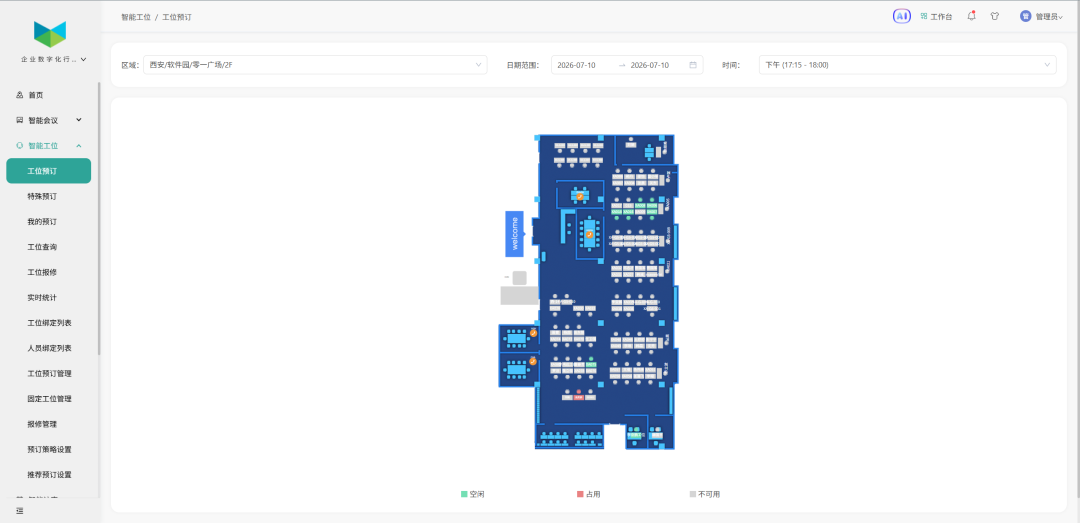
First, make every desk “visible”. In the past, finding a desk meant floor-by-floor inspection and asking around; now all desk status enters the system in real time — which seats are occupied, which are free, which are reserved, all on one map.
Employees see it in Feishu, DingTalk or WeCom, navigate directly to their assigned seat, or pick a suitable spot from the shared pool. No manual intervention, significant labor savings.
Module 2: Allocation & Check-in — Solving “Who Is Using It”

The fixed-desk problem is “bound does not mean in use”; the shared-desk problem is “booked does not mean present”. So real occupancy mechanisms are built for both:
Fixed desks: bound to people long-term; employees sit on arrival, and the system continuously records actual usage via access control and presence sensing. Long-unused desks are flagged as abnormally idle for admins to evaluate release.
Shared desks: employees filter free seats by floor, area and equipment, while the system actively recommends based on team location and historical preference; successful booking locks the desk. On arrival, scanning or swiping completes check-in — without it, the booking auto-expires and the desk is released. Missed check-out, timeout check-in, or long absence detected by sensors also trigger rule-based release, returning seats to those who truly need them.
Both mechanisms can run in parallel in one building: core roles keep stable ownership while the flexible pool circulates — no desk is wasted, and every seat serves someone truly on site.
Module 3: Data Dashboard — Solving “What If It Is Empty”
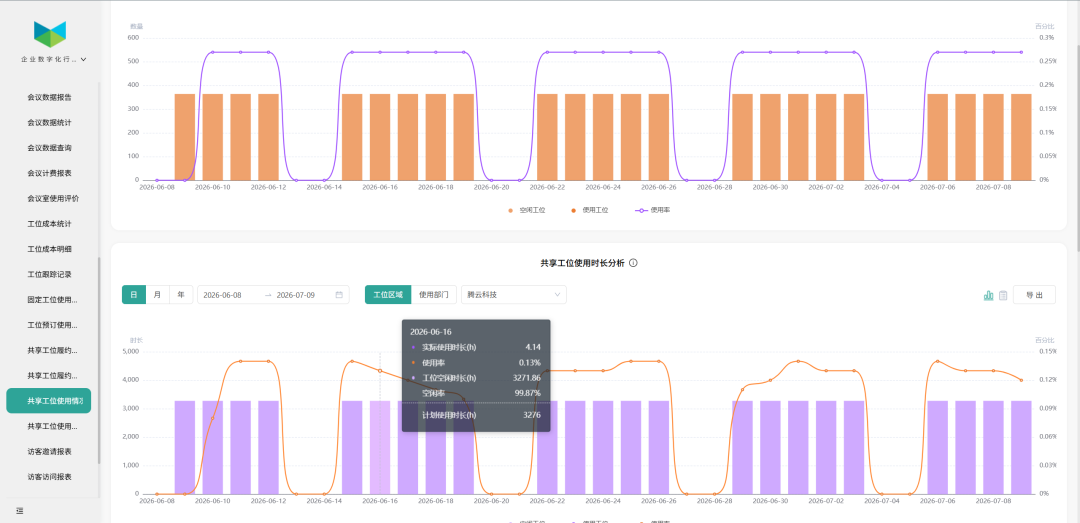
Many space management efforts fail because companies know only the “total number of desks”, not the real usage. The Virsical system automatically generates: utilization by floor, vacancy by area, binding rate by department, peak occupancy periods and turnover efficiency.
These data tell managers the truth: which area is chronically overloaded and needs expansion? Which floor sits above 40% vacancy and should shrink? Which department applied for 100 desks but actually uses 60? Decisions shift from “gut feeling” to precise, data-driven adjustment.
03 After Go-Live, What Changed in Desk Management?
Before go-live
Decisions without evidence: facing lease expansion or relocation, admins lacked real-time accurate data and relied on rough verbal estimates — risky and uncertain.
Hidden cost waste: some departments were desk-tight yet staff traveled constantly, desks sat idle long-term, and admins could not pinpoint inefficient areas; rent accumulated year after year.
Manual, time-consuming processes: desk inventory relied on floor walks and paper ledgers — slow, error-prone, and admin teams drowned in repetitive statistics.
After go-live
Data-driven decisions: real-time occupancy, usage and release statistics generate visual reports, giving admins a complete view at a glance.
Precise cost control: idle desks are identified accurately, blind expansion is avoided, and rent costs are saved at the source.
Admin efficiency released: automated data collection replaces manual inventory, letting teams focus on higher-value work.
04 Let Every Square Meter Serve People
The real goal of desk management is never stricter control by admins, nor forcing one model on everyone — it is letting every team sit healthier, more efficiently and more conveniently in the way that suits them.
Smart workstations integrate with access control and visitor systems: employees swipe to auto-check-in after booking; contractors and temporary visitors get dedicated shared areas that admins allocate on demand without crowding internal resources. For multi-city, multi-park groups, headquarters policies roll out uniformly while each park adjusts locally — global workstation usage visible in real time on one screen.
Desk waste is usually not because space is truly insufficient, but because circulation depends too much on people — on-site hunting, manual registration, experience-based estimation. Mature space management lets fixed, shared and hybrid modes each serve the right teams, so the right things happen automatically. Virsical Smart Workstations — every square meter serves people.
Contact us now to claim a free trial quota — a zero-burden smart workstation transformation.